.svg)
%201.svg)


%201.svg)
담당자가 프로모션 코드를 발송해 드립니다.
와탭을 경험해 보세요.
와탭을 경험해 보세요.
와탭을 경험해 보세요.
와탭을 경험해 보세요.
와탭을 경험해 보세요.
와탭을 경험해 보세요.
와탭을 경험해 보세요.
와탭을 경험해 보세요.
WhaTap AI를 경험해 보세요.
How to Measure GPU Utilization in MIG-Enabled Environments
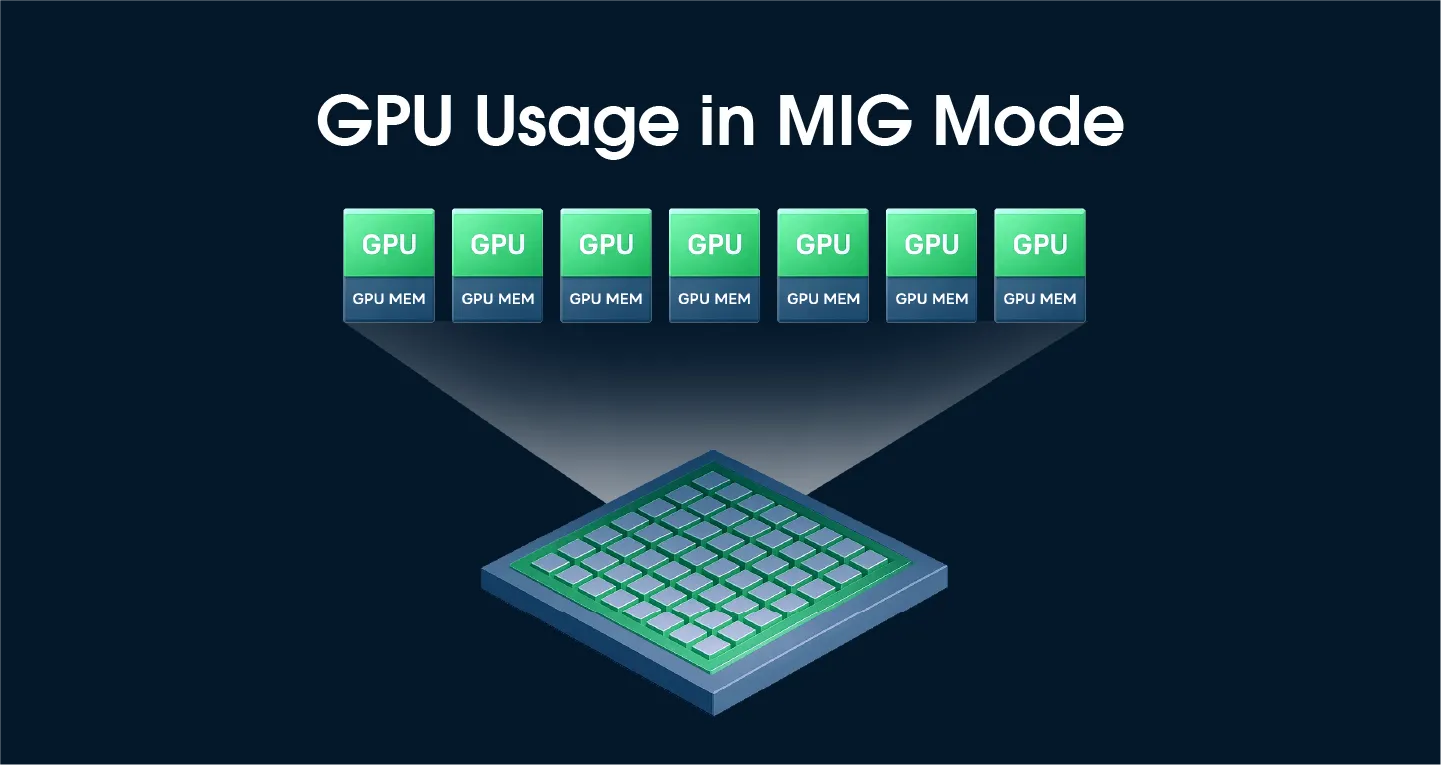
Introduction
NVIDIA's Multi-Instance GPU (MIG) technology enables efficient resource utilization by partitioning a single GPU into multiple independent instances. However, MIG mode introduces constraints for traditional GPU utilization monitoring. This article describes the GPU monitoring challenges in MIG environments and presents a solution based on DCGM_FI_PROF_GR_ENGINE_ACTIVE.
GPU Utilization Measurement Limitations in MIG Mode
According to NVIDIA's official documentation, traditional GPU utilization metrics are not supported on GPUs with MIG mode enabled.

The NVIDIA MIG User Guide states this restriction explicitly:
"GPU utilization is not supported when MIG mode is enabled."

This is where the dilemma arises.
A Real-World Dilemma
Consider the following scenario:
- 8 A100 GPUs installed on a single node
- 4 of the GPUs have MIG mode enabled
- The remaining 4 GPUs are used as standalone devices
How do you calculate the average GPU utilization of the node in such an environment? Since the 4 MIG-enabled GPUs report N/A for utilization, should you exclude them and calculate based on only the 4 physical devices?
Solution: Use DCGM_FI_PROF_GR_ENGINE_ACTIVE
How to Calculate Utilization per MIG Instance
There is a way to accurately measure GPU utilization even in MIG mode — by using the DCGM_FI_PROF_GR_ENGINE_ACTIVE metric.
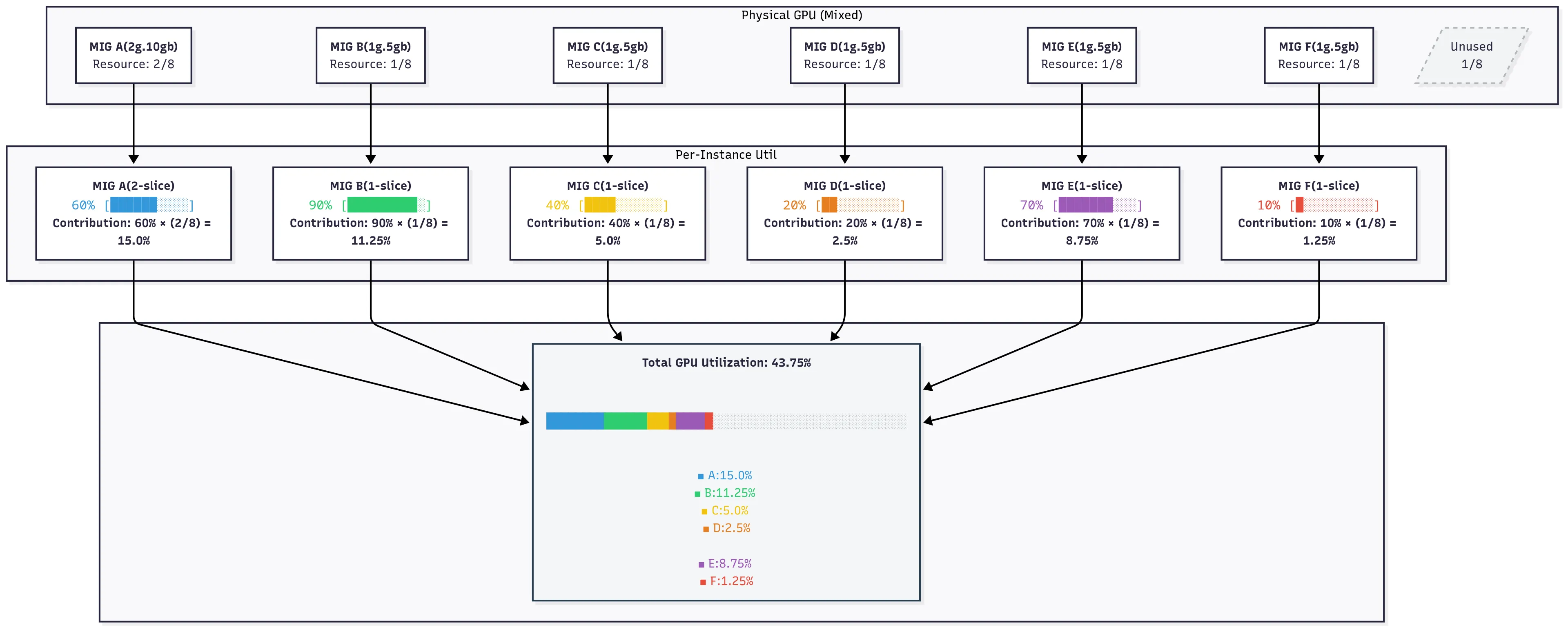
Calculation Formula
Overall GPU utilization = Σ (utilization of each MIG instance × the compute-slice ratio of that instance)
Example (on an A100, which has 7 compute slices in total):
Total GPU utilization: 50.0%
This approach has a clear technical foundation. Both the choice of the DCGM_FI_PROF_GR_ENGINE_ACTIVE metric and the weighted-calculation methodology are grounded in NVIDIA's official documentation and recommendations. The rationale for the alternative metric and the calculation methodology is explained below.
1. Rationale for Using an Alternative Metric: NVIDIA's Official Response on GitHub
Source of evidence: NVIDIA DCGM GitHub Issue #64
An NVIDIA developer responded:
"DCGM_FI_DEV_GPU_UTIL is roughly equal to DCGM_FI_PROF_GR_ENGINE_ACTIVE. DCGM_FI_PROF_GR_ENGINE_ACTIVE is higher precision and works on MIG."
This answer provides the official basis for why DCGM_FI_PROF_GR_ENGINE_ACTIVE can be used as an alternative indicator of GPU utilization.
Characteristics of GR_ENGINE_ACTIVE
- Metric ID:
DCGM_FI_PROF_GR_ENGINE_ACTIVE - Function: Measures the activity level of the NVIDIA GPU's graphics engine (GR engine).
- Official definition (NVIDIA DCGM docs): "Ratio of time the graphics engine is active. The graphics engine is active if a graphics/compute context is bound and the graphics pipe or compute pipe is busy."
- Characteristic: Despite the "Graphics" in its name, this engine handles both graphics and general-purpose compute workloads — which is why it is valid as a GPU utilization indicator for CUDA-based workloads.
- MIG compatibility: Supported and reported accurately per MIG instance.
- Precision: Higher precision than the legacy
DCGM_FI_DEV_GPU_UTIL, which often reports only 0% or 100% in practice.
2. Basis for the Weighting Methodology: NVIDIA DCGM Official Documentation
Source of evidence: NVIDIA DCGM- Understanding Metrics
Based on the metric definitions in the NVIDIA DCGM official documentation, a methodology for converting per-MIG-instance utilization into device-level utilization through weighted calculation can be derived.
1) Core Formula
Total GPU Utilization = Σ (Instance_Utilization × Slice_Ratio)
2) Detailed Calculation Process
For each MIG instance:
Instance_Utilization=DCGM_FI_PROF_GR_ENGINE_ACTIVE(range: 0.0 to 1.0)Slice_Ratio=Instance_Compute_Slices / Total_GPU_Compute_SlicesWeighted_Contribution=Instance_Utilization × Slice_Ratio
3) Worked Example
On an A100 GPU (7 compute slices in total):
Total GPU utilization: 0.1714 + 0.1286 + 0.0571 + 0.0286 + 0.1000 + 0.0143 = 0.5000 (50.0%)
Note on A100 slice counts: The A100 has 7 compute (SM) slices and 8 memory slices. This is why the MIG profile naming convention is{compute}g.{memory}gb— for example,1g.5gbmeans 1 compute slice and 5 GB of memory (1/8 of the 40 GB total). The weighting in this methodology is based on the compute slice count (the number beforeg), not memory.
4) Metric Interpretation (Based on DCGM Official Documentation)
- Value range: 0.0 to 1.0 (ratio)
- 0.0: GPU engine is completely idle
- 1.0: GPU engine is fully utilized
5) Practical Considerations
- Values can fluctuate momentarily depending on the characteristics of the GPU workload.
- Consider applying a moving average for more stable monitoring (a common monitoring best practice).
Industry Adoption
- OpenCost: PR #2853 switched from
DCGM_FI_DEV_GPU_UTILtoDCGM_FI_PROF_GR_ENGINE_ACTIVEfor GPU cost calculations, citing higher precision and MIG support. The PR author noted that this was confirmed with a DCGM product manager. - Red Hat OpenShift: The NVIDIA DCGM Metrics Dashboard has been discussed to migrate from
DCGM_FI_DEV_GPU_UTILtoDCGM_FI_PROF_GR_ENGINE_ACTIVE(dcgm-exporter Issue #341) because the legacy metric only reports 0% or 100%.
Conclusion
GPU monitoring in MIG mode can be solved based on two key foundations:
- NVIDIA's official response:
DCGM_FI_PROF_GR_ENGINE_ACTIVEcan be used as an alternative indicator forGPU_UTIL, and it supports MIG with higher precision. - NVIDIA's official documentation: A weighted-calculation methodology, grounded in the definitions of profiling metrics, allows per-instance values to be aggregated into a meaningful device-level utilization number.
Combined, these provide an accurate, technically defensible method for measuring overall GPU utilization even when MIG is enabled — closing the gap left by the legacy DCGM_FI_DEV_GPU_UTIL metric.
References
- NVIDIA DCGM GitHub Issue #64 — https://github.com/NVIDIA/DCGM/issues/64
- NVIDIA MIG User Guide — https://docs.nvidia.com/datacenter/tesla/mig-user-guide/
- NVIDIA DCGM Field Identifiers — https://docs.nvidia.com/datacenter/dcgm/latest/dcgm-api/dcgm-api-field-ids.html
- OpenCost PR #2853 — https://github.com/opencost/opencost/pull/2853
- NVIDIA DCGM Issues #138, #152 — https://github.com/NVIDIA/DCGM/issues
.webp)
.webp)

.webp)


